

Dear reader: This article contains links to products and services that I may be compensated for, at no extra cost to you.
When planning my recent trip to China (with stops in Shanghai, Hangzhou, Lijiang, Tiger Leaping Gorge, Shangri-La, and remote Yubeng village), one of my biggest worries was staying connected. You pretty much cannot survive in China today without a phone and Internet connection.
In China travel forums, I saw the same questions over and over: Which eSIM is the best for China? Do I need a VPN? Will I be able to access this app or website in China?
After a lot of research, I chose this this Holafly China eSIM (get 5% off with the code NICKKEMBEL at checkout!), and I’m happy to say it worked really well, with super easy setup, 24-hour support, and unlimited data — even when hiking in super remote areas of Yunnan! It was a better experience than I’d had with another major international eSIM, Airalo, on a previous trip.
In this Holafly review for China, I’ll explain why I chose a Holafly eSIM instead of a regular SIM, the pros and cons of my choice, how to set it up, why I liked it better than Airalo, what it was like using Holafly throughout my trip, and why I now think Holafly is the best eSIM for China – and I’ve since used it for several other countries too!
In another article, I’ve also compared Holafly and Airalo eSIMs for traveling in Asia more generally.
Table of Contents
Traditional SIM vs. eSIM for China
As you may or may not know, China has something called the “Great Firewall”, which is the world’s largest and most sophisticated Internet censorship system.
This means that if you get a regular SIM card for China, you won’t be able to access website or apps that you most likely want to during your trip, such as Facebook, Messenger, Google, YouTube, X, Twitch, Reddit, TikTok, ChatGPT, Instagram, and Wikipedia.
To overcome this, most travelers get a VPN, and which VPN to choose for China is a widely discussed topic in China travel groups.
A second option is to get an international eSIM instead of a regular SIM. The two most popular ones are Holafly and Airalo.
One of the advantages of these eSIMs in China is that they will bypass the Great Firewall, which means you can still access all those websites and apps and don’t need to get a VPN for your trip.
Some travelers point out that a local Chinese SIM card + VPN is cheaper than most eSIMs, especially ones with unlimited data like Holafly.
However, for my trip, I prioritized convenience over cost – I’ll elaborate in the next section.
Holafly also offers an Asia regional eSIM and a Global eSIM. Both will work in China, too. This is super convenient if you are traveling to multiple countries.
Pros and Cons of Using an eSIM in China
Here are some factors I considered when making my choice between a SIM or eSIM for my China trip.
Compatibility
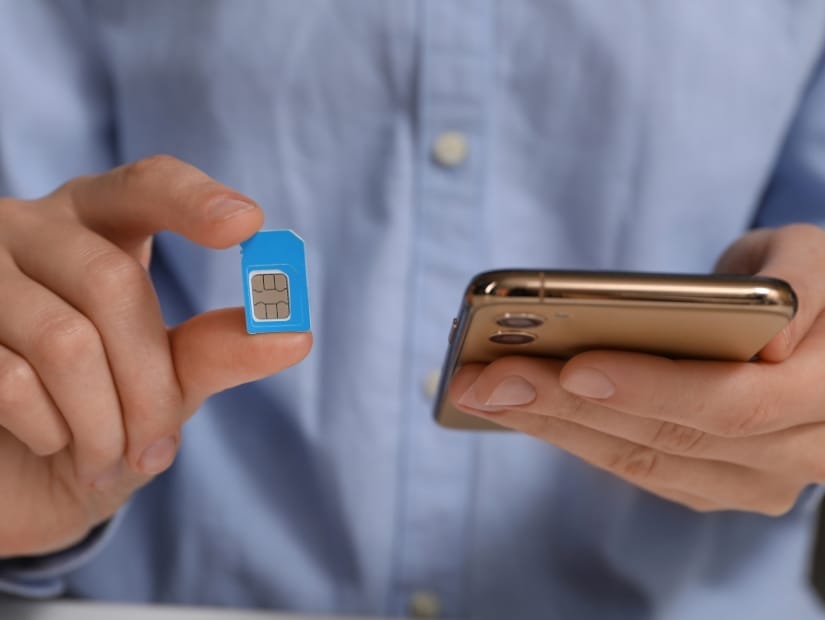
Some phones, including the newest iPhones (iPhone 14 and later), no longer have slots for SIMs, so using an eSIM will be your only option.
If you have an older phone, you’ll need to make sure it’s eSIM compatible. Here’s how to check, or you can see if you phone is on this list.
Convenience
For a traditional SIM, you have to purchase the card in person and physically insert it into your phone, typically at the airport or a phone shop in the city.
Before your trip, you’ll also have to research the various VPNs, choose one, and figure out how to use it.
With an eSIM, you set it up on your phone before your trip then just turn it on the moment you arrive. And Voila – you can access everything as soon as you arrive. It’s crazy convenient.
I was literally checking messages from my family on Messenger as I walked off the airplane in Shanghai.
I will say that the first time you ever using an eSIM could be a little intimidating, especially if you aren’t tech savvy. You’ll have to change a few settings in your phone.
On a previous trip in a different country, I had some trouble setting up an Airalo SIM (one of the reasons I don’t use Airalo anymore).
I had no issues setting up my Holafly eSIM in China, though.
And once you use an eSIM once, you’ll feel like a pro, and you’ll find it super easy to just keep using the same app for other eSIMs on your future trips to other countries.
Data
One downside of eSIMs is that some popular ones, like Airalo or Nomad, come with limited browsing data.
Some super apps that you’ll need to use in China, like WeChat and Alipay, are known to use lots of data.
I learned from personal experience in another country that when I have limited data, I tend to always worry about using it too much, even knowing that I can always buy more data if I need it.
The Holafly eSIM I used came with unlimited data, which was ideal. But that also meant it cost a bit more for the initial purchase. For me, I’d rather just pay for it up front and then not think about it the whole trip.
If you’re considering the Airalo vs Holafly eSIM for China, as these are two of the most popular ones, I’d personally just spend the extra money for the unlimited data Holafly eSIM.
Having a Phone Number

If you purchase a Chinese SIM card, you’ll have a local Chinese phone number. With an international eSIM like Holafly or Airalo, you won’t.
Before my trip, I wondered – will I ever need a need to make a phone call in China? The answer was – most likely no. Nowadays, Chinese mostly communicate with the WeChat app, anyways.
To sign up for WeChat, you’ll need a phone number. It is recommended to sign up for the app before you leave home. Therefore, I signed up for WeChat using my home phone number in Canada.
Once I was in China, I had to complete some more setup steps on WeChat, and they required me to receive a code by text message. When that happened, I just turned on my home SIM to receive the text. I just didn’t turn on data roaming on my home SIM, so that I wouldn’t incur any steep charges. It worked, and then I just turned it off again.
While traveling around China, I often used Didi (China’s version of Uber) to get around. It’s extremely cheap and convenient. While there is a Didi app, you can also order Didis via WeChat or Alipay, the two payment apps, and the funds are automatically taken from your account.
In order to use Didi via WeChat or Alipay, I didn’t need a number to sign up. When the Didi would pick me up, they sometimes wanted to know the last 4 digits of my phone number, to confirm I was the right person. I would tell them the last 4 digits of my home phone number, and that worked.
It is possible that you may want to have a phone number for other things in China. You might want to make some local calls or you might need it to sign up for some other apps. However, for my trip, there was never any point on the trip where I needed it.
Accessing Websites and Apps
Whether you use a SIM + VPN or an eSIM like Holafly, you’ll be able to access all the websites and apps you want to.
It’s worth mentioning that for GoogleMaps, even though I could access it thanks to my eSIM, the app just sucks in China. The maps are super outdated and locations are often totally wrong.
For navigation, I used AppleMaps 90% of the time. It works as well as GoogleMaps does in other countries, but unfortunately doesn’t have all the reviews like GoogleMaps. Other travelers speak highly of Amaps, while BaiduMaps is excellent but all in Mandarin.
Lastly, some people point out that with an eSIM, if you ever want to use WiFi (such as in your hotel), then you’ll still need a VPN to access banned websites. This is an issue to consider if you plan to use WiFi a lot. For me, I just never used the hotel’s WiFi and always used my eSIM, even when I was in the hotel.
Why I Chose Holafy (instead of Airalo)
I’ve used eSIMs in other countries besides China. My first eSIM experience was with Airalo (in Peru). It was OK. After I figured out how to set it up (which, in retrospect, was more complicated that my experience with Holafly), it worked fine.
But I didn’t like that the data was limited. The eSIM seemed so cheap at first, but then the data ran out super quickly and I had to add more several many times. I was always conscious of how much data I was using, even though it was cheap to add more.
But then my second Airalo experience in Japan was straight up bad (read about it in more detail here). Setting it up the first time went fine, but when I tried to add more data mid-trip, I found it almost impossible. I spend a whole hour fiddling with phone settings until I finally gave up and just bought a new one. That was the last time I would use Airalo.
For my trip to China, I had heard a lot of good things about Holafly in travel groups. Moreover, Holafly offers unlimited data plans not to mention coverage in 200+ destinations around the world. So I decided to give it a shot!
My Experience Setting Up and Using the Holafly eSIM

Setting up and using the Holafly eSIM was a breeze for me. Before my trip, I simply downloaded the Holafly app.
Opening the app, I clicked through the welcome pages. Then, under “Where are you traveling next”, I entered “China”.

The next screen showed me unlimited eSIM plans ranging from 5 to 90 days. For my two-week trip, the 15-day plan (USD 50.90) was perfect. Please note, since then, they have added the option to customize the number of days, so you can choose exactly how many you need.
On the next screen, I paid for it.

Then, I clicked “My eSIMs” on the bottom menu to find my China SIM and click “Install and activate”. Note: You’ll need to have an Internet connection while doing this.
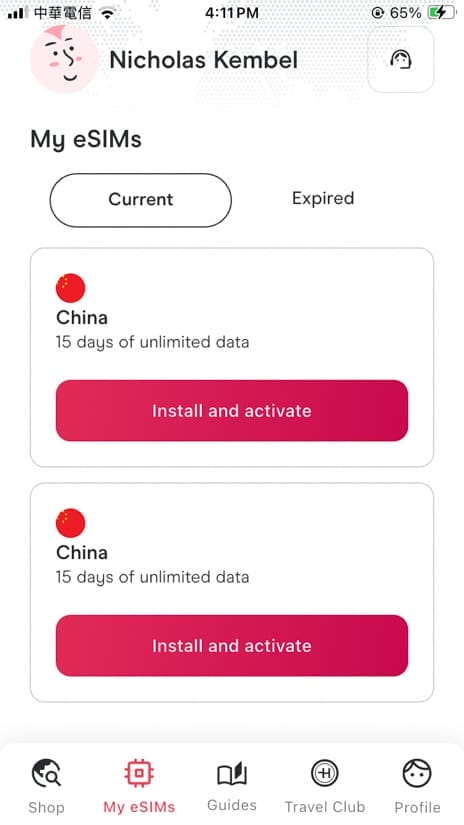
The app then took me through a series of instructions on how to set up the eSIM, including naming it (I chose “China Trip”) and choosing it my your Primary (default) or Secondary Line. I don’t think it matters which one you choose.

After doing this, in my iPhone settings, if I clicked “Cellular”, I could see my home SIM and the China Trip SIM. My Home SIM was “On” and the China Trip SIM was “Off”.
The remaining instructions shown by Holafly were to be done after arriving in China.
Once I landed in China, I turned my home line to “Off”. Later, when I would need to receive texts, I would turn this one on again briefly, but make sure that “Data Roaming” below stayed off.
Then I turned the Holafly line to “On” and also turned its Data Roaming to “On”, as recommended by Holafly in the below screenshot of the setup instructions.
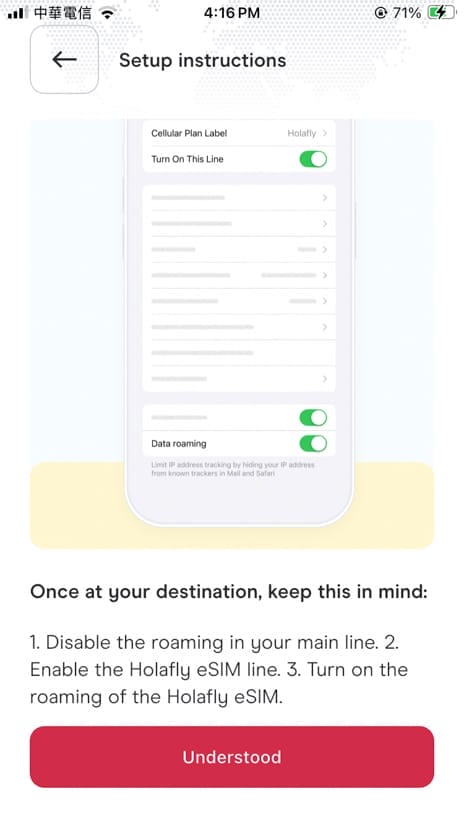
After I did this, it took a minute or two for the phone to connect to a network. I remember it was slow to connect at first, so I turned my phone off and then on again. And voila – I had full Internet access before even getting off the airplane.
Over the next two weeks, my Internet worked seamlessly everywhere I went. The connection was fast and I could access all the apps and websites I wanted to. Watching videos was fine, too, although I don’t usually watch many.
The true test would come when I would visit some more remote locations, like hiking in Tiger Leaping Gorge and to remote Yubeng village, both in Yunnan province.
For both, I had Internet the whole way, with the exception of a few especially deep valleys, where I don’t think anyone on the trail had a connection.

Overall, If you’re looking for a stress-free way to stay connected in China without fiddling with VPNs or worrying about data limits, Holafly is a great choice. It worked flawlessly for me in major cities and remote areas alike.
I intend to keep using Holafly for any future trips where I decide to go with an eSIM.
Just click here to check the prices for a Holafly eSIM in any destination you plan to visit!


Do I need my home SIM card in to use halofly ?
Or I can use without home sim on
No, you don’t, unless you want to still receive texts from home.
Hello Nick, your article is very helpful and thank you very much for sharing!
Could you please help clarify some of my confusions on using Holafly eSim in China?
Looks like I have installed Alipay and Wechat apps and connected credit card on my iphone 17 ( Does this means both apps will work successfully later?) with american passport while in U.S. But I am worried that Holafly eSim with its built-in VPN may cause trouble when I use AliPay, WeChat pay and Didi in China because of China’s Great FireWall. Did Holafly esim work well with Alipay, WeChat Pay and Didi for you when you were in China. I will certainly get Holafly esim if it has already worked for you,
Could you please also confirm that: In order to receive text while in China, all I need to do is just to “Turn On This Line” and I can keep Cellular Data “Off” and “Data Roaming Off”? (FYI: on my iPhone 17, I have to turn on Cellular Data first in order to turn on Data Roaming.) After adding Holafly eSim on my phone, do I have to turn on Cellular Data in order to turn Holafly Data On? Or is Holafly eSim line and its Data Roaming switched on and off separately from my home line?
It is so confusing to just image! But I have to understand before I make the purchase.
Thank you very much for your help in advance! We really appreciate it!
Joy
First, setting up AliPay and WeChat before your trip doesn’t guarantee that they’ll work when you get there. That’s exactly what I did, but when I arrived in China, I found my WeChat wouldn’t work. I tried so many times and ways to make it work, including getting a local to verify me, and I just couldn’t. Finally I got it to work 1.5 weeks into my 2 week trip. That’s why it’s good to try both, in case one doesn’t work. Next, using Holafly eSIM doesn’t have any impact on AliPay and WeChat working. The thing that made my WeChat not work, I *think*, was that I hadn’t completed every single item in the personal information section. I agree with you that the phone settings are confusing. But essentially, when you purchase the Holafly eSIM, there will be a guide on how to set it up on your phone and name it. Then, you can go into your phone’s settings and turn your home SIM on/off, and turn the Holafly eSIM on/off. I kept my home SIM and data roaming off, but I turned it on shortly a few times in order to receive a text with code when I was trying to get WeChat to work. In addition to the guide Holafly provides in app when you’re setting it up, you can trying watching some YouTube videos showing the process, and contact Holafly for live support if you need it. Good luck!
Thank you so much for this post!! I was going to use HolaFly anyway because I’ve had a good experience using it in the past, but you’ve eased my worries about if I needed to get a VPN with it as well. I’ll use your code when I buy the eSim for my travels next month! 🙂
So glad to hear – thanks for that!
Hi Nick! Nice post. I was reading that using Holafly you won’t be able to access to ChatGPT or Tiktok, since it’s been used from HK.
Do you remember if it worked for you?
Hey, I’m sorry that I didn’t actually try either of those apps while in China, so I can’t say for sure. I’ve contacted Holafly to ask, and they said it’s possible those two won’t work, and thus they recommend also using a VPN if you need to use those while in China.
Hi Nick, could you clarify which currency you used to pay for Holafly? Did you use your local currency or the destination’s currency?
Their page automatically showed me the eSIM price USD. But at the top I clicked the currency button and switched it to my home currency.
Hi Nick, I am a senior traveler. I speak Chinese and spend a month or two there every year. I have also had a devil of a time with the internet there, including several VPNs that didn’t work. Because I am not tech savvy, what apps should be downloaded before going, and what should I do after arriving?
Also, as I generally prefer a laptop to a phone, I wonder if i can hotspot connect my computer to my phone, as I sometimes do in Canada, if I am using Holafly. Greatly appreciate your comments on this.
While I didn’t bring my laptop on this trip, I didn’t try it, but I can understand as I also prefer using laptop. But you should definitely be able to connect your laptop to your phone and share Holafly’s Internet signal with a hotspot. As for apps, that is beyond the scope of my article, so I think you should look up some articles specific to that question. I’m a minimalist with apps, so I only downloaded a few totally essential ones. Alipay AND Wechat are musts for payment (best to have both in case one works) and WeChat for communication. I ordered Didis (like Uber) through Alipay, no need for Didi app. Trip for hotel bookings, HSR tickets, and tickets to some attractions. And a few map apps (I used Apple maps because I have iPhone, others recommend Amap, while Baidu is good for Mandarin). There are so many more that people recommend, but those are the only ones I used.
Hi Nick
I’m a Canadian looking to travel to Kunming, China. As my phone is not eSIM -compatible, do I need a local SIM card to use WeChat or Alipay?
Also, how do I apply for a visa? I’m currently living in Taiwan (it’s been about 10 years since I’ve been in Canada). I’m planning on staying in China for 4 to 5 days.
One last question, how much should I expect to pay for a local Chinese-speaking only tour guide–on foot (I speak some Chinese and don’t need car services)
Thanks a lot in advance for your help!
China has recently started allowing visa-free entry to China for those coming on a Canadian passport, so please look up the news and info about that. You absolutely need Internet for surviving and paying for things in China, so yes, you’ll be looking at getting a regular Chinese SIM card on arrival. You can find options on Klook or just buy one on arrival. I’ve never hired a guide in China so I’m afraid I can’t speak to that. Good luck with your trip!
Thanks for your reply!
Hi Nick thanks for your comments and I took heed. I did buy a Holyfly eSIM and I bought a Trip .com for my husband as I have to run a business while I’m away and he doesn’t. We are in China now. Holafly is meant to be best in Yunnan especially in remote areas. The Holyfly Asia unlimited plan was 5x more expensive than the Trip.com. I also thought I would get to keep my original number. This is what I found.
1.Trip.com has the same if not better speed and coverage. Though it is not unlimited it is pretty generous.
2. You only can activate your phone number if you are from US, Canada or UK. So no phone for me an Aussie. But that is not obvious until you try. Holafly.
3. Holafly has the audacity to ask unbidden how are you finding it. . Half way through the conversation you realise you are speaking to AI with no way to escalate it. I found it infuriating!
Next time I will buy Trip.com eSIM and save lots of money.
To answer the question about Chat GPT. Yes you can access it using a forge in eSIM for China
Thank you so much for your feedback, Jen, and I’m sorry to hear your experience with Holafly didn’t live up to expectations. I will take this feedback into consideration next time I review and edit this article.